
Learning Support Tools

iThenticate
Please be advised that as of February 26, 2026, the iThenticate system has been updated from version 1.0 to iThenticate 2.0. Effective immediately, the new login link is: https://pweduithenticate.turnitin.co
The iThenticate program allows the verification of the originality of document (primarily in English) before publication by comparing it with open-access Internet resources and databases indexed by iThenticate. We do not recommend checking texts in Polish due to an insufficient reference database.
The programme is aimed at WUT researchers and PhD students - the number of accounts is limited.
You should use your account to check your own research papers (whether authored or co-authored).
Warsaw University of Technology has a limited number of check reports available. Each time a document is resubmitted, it counts as a new check; therefore, please use the system judiciously.
The results of the analysis are presented in the form of a report, which includes:
- similarity indices (for the entire document and individual sources), which specify the percentage of borrowed content found in the analyzed document.
- highlighted sections of the work that are identical to texts found in the comparison databases, along with their sources.
If there is no activity on the account for more than 3 months, the account will be deactivated, and the user will be notified via email. Significant exceeding of limits may result in action by the Program Administrator.
Please submit applications via the registration form (an email address in the @pw.edu.pl domain is required).
If you do not see an email with an activation link in your inbox:
please check the following folders: Spam / Promotions / Notifications / Other, if the email is not in any of the above folders, please contact the system administrator at BG PW: This email address is being protected from spambots. You need JavaScript enabled to view it..
For more information:
Grammarly
Grammarly Premium is a tool for correcting linguistic errors in English texts. Grammarly checks grammar, punctuation, style and spelling (see more info „Your Go-To Guide for English Grammar“)
Please submit your application to open an account via the registration form (an email address ending in @pw.edu.pl is required).
The number of accounts is limited within each user group.
In the event of inactivity on the account for more than 3 months, the account will be deactivated and the user will be informed by e-mail.
Grammarly allows you to use functionality that works directly when you write texts:
- in Word
- in a web browser
- as a desktop application for Windows and macOS
- and as a mobile app
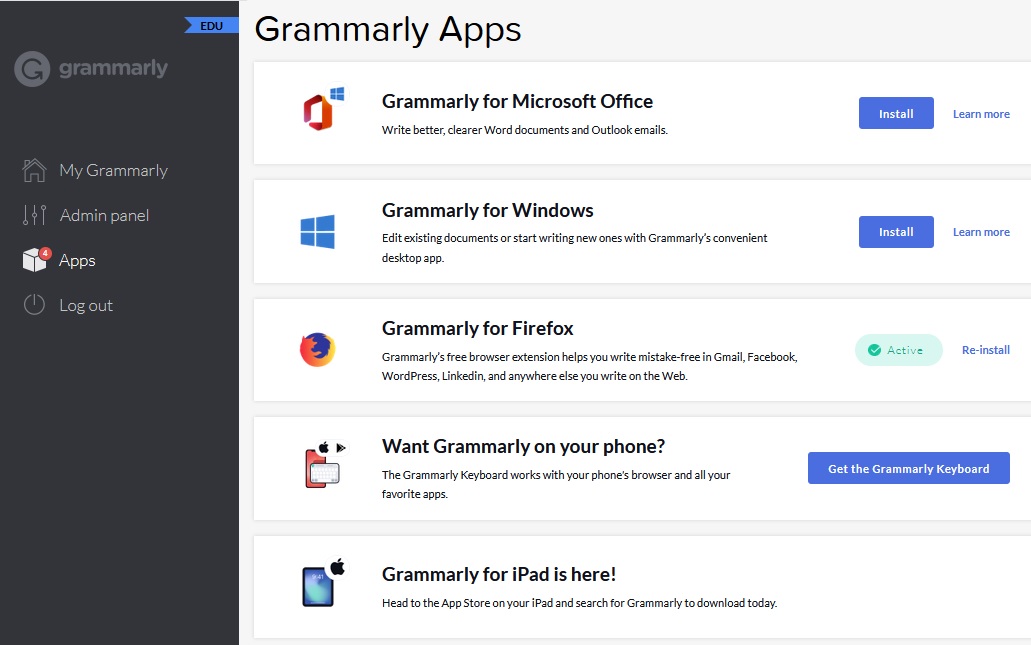
The list of applications can be seen after logging in under the Apps tab (on the left-hand side of the screen).
BioRender
Is a tool for creating professional scientific illustrations to support research, teaching and publishing activities. It enables the creation of multi-coloured diagrams, charts and graphics for use in scientific publications, presentations, teaching materials and research projects.
The programme is aimed at research and teaching staff, as well as PhD students at Warsaw University of Technology. The number of available accounts is limited.
If an account remains inactive for a period of more than 6 months, the Library reserves the right to contact the user to verify whether they are still using the tool.
BioRender offers:
- over 50 000 pictograms from the fields of medical, natural and agricultural sciences
- over 5 000 ready-made templates
- icon libraries created by professional scientific illustrators
- tools for creating diagrams, charts, infographics and visual abstracts
- an AI module supporting the generation and modification of illustrations based on text commands (20 000 AI credits in the institutional pool, plus an additional one-off allocation of 50 AI credits for each user).
AI credits
Under the Warsaw University of Technology licence, users have access to a shared, institutional pool of 20,000 AI credits, which is replenished at the start of each licence period. In addition, each account has 50 individual, one-off AI credits. Credits from the institutional pool are used first. Individual credits are only used once the institutional pool has been exhausted. Users who used BioRender before joining the university licence (e.g. during a trial period) retain their projects, account history and any unused AI credits assigned to their individual accounts.
The AI credits available under the institutional licence form a shared pool for the entire academic community of Warsaw University of Technology. In order to ensure equal access to resources for all users, the Library reserves the right to impose limits on the use of AI credits if the rate of usage indicates a risk of the institutional pool being exhausted prematurely.
Creating an account
- To access the tool, please complete the registration form, providing an email address in the pw.edu.pl domain. Your account will be set up on the next working day.
- An email containing an account activation link will be sent to your email address
- If you do not receive an email with the activation link, please check the following folders: Spam / Offers / Notifications / Other. If you continue to experience problems, please contact the system administrators or the WUT Main Library Reference and Bibliometric Analysis Department.
Contact:
WUT Main Library Reference and Bibliometric Analysis Department: This email address is being protected from spambots. You need JavaScript enabled to view it.
System administrators:
Magdalena Maciąg – tel. 22 234 73 00, This email address is being protected from spambots. You need JavaScript enabled to view it.
Iwona Moroń-Chmielarska – tel. 22 234 73 00, This email address is being protected from spambots. You need JavaScript enabled to view it.
More on BioRender:
- M. Jankowski, BioRender step by step (PL), https://www.youtube.com/watch?v=dPjZjzpCk90
- M. Jankowski, Guidelines for creating medical vector graphics. How to create biological or medical graphics using the BioRender application, https://ucbsm.ump.edu.pl/zalecenia ∗https://www.biorender.com/webinar (in English) ∗ https://www.biorender.com/learn?utm_source=marketing_site_topnav (in English)
- Instructional materials and tutorials: BioRender | Learning Hub
- Help centre: https://help.biorender.com
- Developer’s website: https://www.biorender.com/
SciFlow
SciFlow is an advanced tool designed for creating and formatting scientific texts, including research articles, theses, and doctoral dissertations.
The tool offers a range of features that support authors at every stage of working on a document:
- Scientific text editor: The tool provides a dedicated editor that facilitates writing scientific texts, including features such as automatic formatting, handling footnotes, and bibliography management.
- Document templates: NIt offers ready-made templates, including manuscript templates for scientific journals, allowing easy adaptation of the document to the editorial requirements of the chosen publisher.
- Collaboration: The tool enables teamwork as well as commenting and editing texts in real time, while preserving the latest version of the document. Co-authors, supervisors, or other users (with the author’s permission) have direct access to the document and can comment on and revise it.
- Bibliography and citations: SciFlow is integrated with bibliography managers (including Zotero, Mendeley, Citavi, EndNote) and offers over 8,000 citation styles.
- Language correction: The tool supports creating scientific texts in any language; currently, language correction is available in English (LanguageTool) and German (Duden-Mentor).
- LaTeX integration: SciFlow works with the LaTeX markup language, facilitating the creation of advanced scientific documents.
- Document export: The tool allows exporting the final, professionally formatted text in various styles.
Using SciFlow helps save time on formatting and organizing the text, minimizes errors in citations and bibliography, facilitates communication with supervisors and co-authors, and ensures the document meets the requirements of publishers or scientific institutions.
SciFlow operates online and requires no additional software installation. It is accessible from various devices (computer, laptop, tablet) and enables collaboration among users from different institutions and countries.
To use SciFlow, please follow the personalized link https://www.sciflow.net/en/wut/start and register an account using an email address with the pw.edu.pl.
More information about the tool and how to use it can be found here:
Reference managers
Bibliography management programmes, known as reference managers, are tools that help to collect and manage data obtained from various sources about the materials used in the work, such as articles, books, chapters, websites, and others.
The use of such programmes is, above all, very convenient and time-saving when writing scientific or diploma theses. The advantage of reference managers is that the bibliographic data are entered into the programme only once and can be used for each subsequent article.
They allow automatic creation of bibliographic descriptions according to your own or selected style and the insertion of references and an appendix bibliography in literally a few clicks. No need to manually edit bibliographic descriptions anymore, or to think about the order of descriptions in the bibliography.
Among the most popular reference managers are:
- Zotero - Literature management programme
- Mendeley - Literature management software*
- EndNote - Literature management programme
Instruction materials on reference managers and learning tools
Change in the Mendeley software usage policy for users using the company/student MS Office software.
Until now, Mendeley Desktop software was used, which was a stand-alone desktop application (it had to be downloaded, installed and used in a local account). By decision of the software manufacturer, this version is no longer being developed and maintained. Alternatively, the manufacturer has made it possible to download and use the Mendeley Reference Manager tool, which is ultimately intended to replace Mendeley Desktop. Unfortunately, the MS Word plug-in dedicated to MS Office 365, for technical reasons, only integrates with cloud accounts (and not local accounts), hence the problem with its use in our University.
To ensure that staff/students can continue to work with Mendeley software, we recommend:
- For Microsoft Office 365 accounts in the cloud (student and doctoral accounts)
- install Mendeley Reference Manager and the Mendeley Cite plug-in
- annotation is only possible for documents in MS Word Online
- For local Microsoft Office 365 accounts (staff accounts): use the legacy version of Mendeley Desktop and install the MS Word plug-in (locally on the device in question) - until the problem is systemically resolved.
- If using versions of MS Office other than 365 (staff devices with earlier versions of MS Office)
- install Mendeley Reference Manager and the Mendeley Cite plug-in
- the plug-in will install locally on the device in question (may require assistance of the system administrator)
Engineering software
Computer terminals for WUT students and staff available In the Main Library are equipped with specialized engineering software:
- ArcGIS Pro 3.3
- MATLAB 2024A
- SOLIDWORKS 2024 SP01
- STATISTICA 13.3.721.1 64-bit (Polish language version)
The terminals also feature: MS Windows 11, MS Office Professional Plus 2019, Python, Visual Studio Community and Notepad++ text editor.
Location
Main Building, Main Library:
- Computer Lab, room 71A (ground floor, next to the Student Lending Room)
- Open Stacks – floor 2, room 242
Open during working hours of Student Lending Room and Open Stacks.
Rules for using the Computer Lab
Computer terminals are for the exclusive use of students and staff of Warsaw University of Technology. Login required:
- for employees: name.surename@prac.wut.pl
- for students: id@stud.wut.pl - where id stands for USOS ID, i.e. a part of the student mail login placed before the @ sign.
- password - same as for mail and Office365.
General characteristics of the programmes
- ArcGIS Pro – a geographic information system (GIS) package designed to operate on spatial data. Allows creation, processing, evaluation, presentation and sharing of geographic information. Includes tools for designing two-dimensional and three-dimensional views, processing images from various sources (drones, satellites, lidar and others), identifying spatial patterns with respect to their changes over time, making predictions, presenting data on interactive maps, and comprehensive data analysis and modelling. See detailed information on ArcGIS Pro
- MATLAB – a programming language and interactive environment designed to perform scientific and engineering calculations, implement algorithms, analyse data and perform computer simulations. Application areas include signal and image processing, telecommunications, control system design, financial mathematics, among others. The package includes: a proprietary high-level programming language, tools for importing data, functions to incorporate C and Java code, interactive tools for data visualisation (two- and three-dimensional graphs, animations), a library of computational functions (linear algebra, statistics, frequency analysis, optimisation), and tools for creating a graphical user interface (GUI). It is also possible to download measurement data and control external devices via the computer's ports. See detailed information on MATLAB
- SOLIDWORKS – an extensive CAD (computer aided design)software package with 3D imaging capabilities. It is designed for engineers, designers and manufacturers. On the basis of a three-dimensional component model, it enables the creation of assembly models, technical drawings, visualisations, motion and load simulations, animations, task schedules, production documentation and performance of many other specialised functions. SOLIDWORKS is designed for the development of structures with up to several thousand components.See detailed information on SOLIDWORKS
- STATISTICA – an extensive set of basic and advanced tools for statistical data analysis. It allows access to data by direct entry or import from selected files (spreadsheet or text documents), processing of data in a number of ways, and construction of queries, charts, reports and models on their basis. In addition, the programme allows you to operate on databases, perform data transformations and create applications (programmable system with built-in Visual Basic language), as well as providing machine learning procedures. The STATISTICA package finds numerous applications in science, technology, engineering, education and management. See detailed information on STATISTICA